Q: Waxing Check-in
- 0.0
- Rating
- 50.00K
- Installs
- Free
- Price

 Analysis by App-foxy
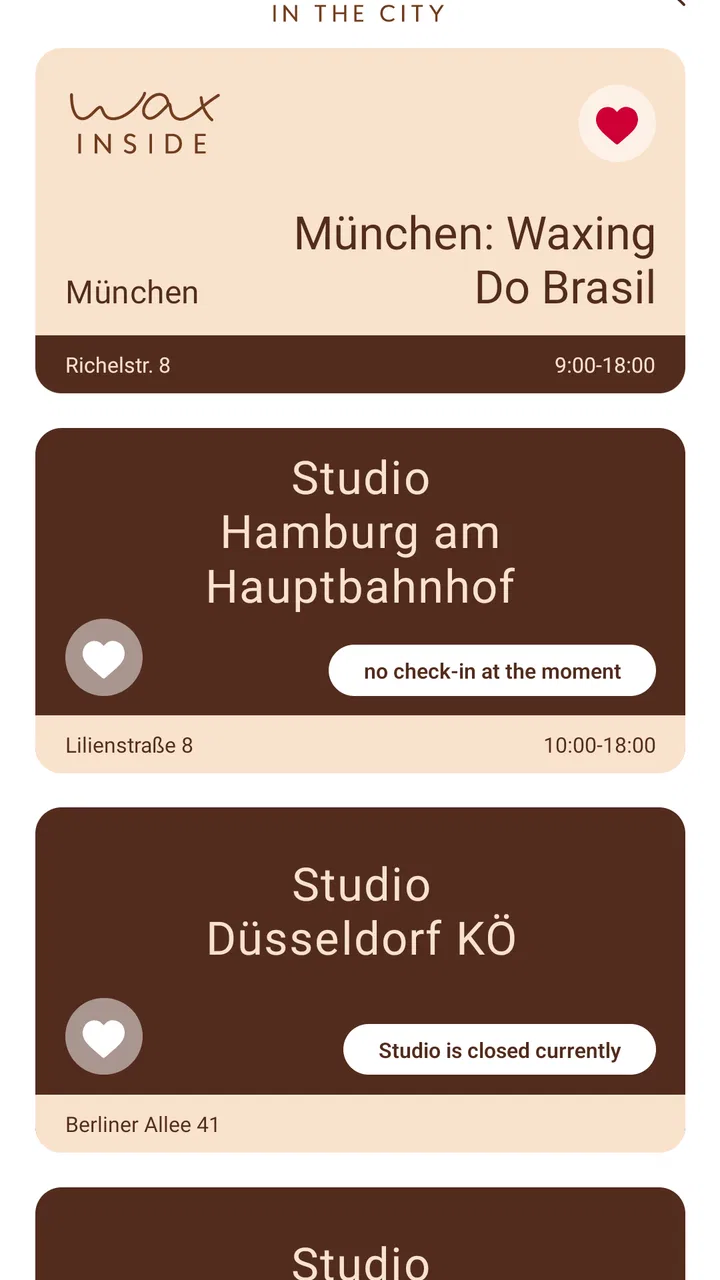
I approached Q: Waxing Check-in as a small, purpose-built beauty app rather than a general appointment platform. Its role is closely tied to WAX IN THE CITY, and the idea is simple: make the check-in part of a waxing visit easier to handle from a phone. That narrow focus is both its appeal and its main limitation. It does not try to become a complete beauty planner, a social app, or a broad salon marketplace.
For someone who already visits WAX IN THE CITY, that focused approach can be useful. I can imagine opening it shortly before an appointment, completing the relevant check-in step, and keeping the arrival process more direct. For a first-time visitor, however, the app needs to be understood as a companion to a specific service experience, not as a standalone tool for comparing salons or learning everything about waxing.
The app is free, is suitable for Everyone, and comes from the developer delodi. It has passed the early stage of a tiny experiment, with over 50 thousand installs, while remaining a relatively specialized download. It was released on August 8, 2017, and the current version is 1.21.0, with Android support from version 7.0 onward. Those details matter because users with older phones may still be able to run it, but the experience can depend heavily on how well an older device handles current app behavior.
You May Also Like

 Blood Strike: 2.5 Anniversary
Blood Strike’s Loadouts Turn Every Drop Into a Tactical Gamble
A close look at Blood Strike’s custom loadouts: how fast access to signature weapons reshapes its battle royale rhythm, rewards preparation, and narrows the gap between fights.

 Pandora - Music & Podcasts
Pandora’s Music Is Easy to Start, but Harder to Recover
Pandora’s strength is its low-effort path from a seed to a station. Its weak spot is how much confidence it asks you to place in connection, setup, and quiet recovery.

 8 Ball Pool
 Is Built on Rivalries, Rematches, and Routine
A close look at the rivalries, rematches, shared routines, and unanswered safety questions that turn a quick pool match into a persistent mobile community.

 Samsung Music
’s Quiet Strength Is Playing What You Already Own
Its reach comes less from spectacle than from dependable access to a personal library. That simplicity is both the app’s strongest retention engine and its ceiling.

 AccuWeather: Weather Radar
AccuWeather Review: A Quick, Clear Forecast for Everyday Decisions
For everyday plans, the best forecast is the one you can understand quickly. AccuWeather makes rain timing, radar, and local conditions easy to act on, with a few trade-offs.

 Hill Climb Racing
Why Hill Climb Racing Still Turns Crashes Into One More Run
A tiny car, a bumpy hill and one more upgrade: Hill Climb Racing keeps resurfacing because its simple chaos makes every near-miss feel personal.
More From Our News Desk
View All News


How the check-in experience feels to use
I find the check-in experience easiest to judge as a short arrival task, not as a reason to keep another beauty app open all day. The useful question is whether it helps me feel prepared before I reach the salon, and that depends as much on timing and a charged phone as on the app itself. From there, the next section looks at how that focused role shapes the way it feels to use.
Readability and navigation in a quick visit
The strongest part of a check-in app should be clarity, and that is the standard I used here. A person opening it is usually not looking for entertainment or a long browsing session. They want to understand what to do next without studying a complicated menu. In that situation, a focused app has an advantage over a full salon-management platform filled with promotions, profiles, appointment discovery, and unrelated account areas.
I found the concept easier to understand when I treated each screen as part of a short arrival workflow. The useful mindset is not “What can this app do?” but “What is the next check-in action?” That distinction is important for people who become overwhelmed by crowded interfaces. A narrow purpose can reduce the number of decisions a user has to make, especially when they are standing outside a salon, carrying a bag, or trying to arrive on time.
Text readability is also affected by the context in which the app is used. A waxing appointment may be booked during a quiet moment at home, but the actual check-in can happen while walking through a busy entrance or waiting for attention at reception. I would therefore keep the phone at a comfortable brightness, avoid relying on tiny text viewed at an angle, and complete as much as possible before arriving. The app is most helpful when it removes a step from the visit, not when it becomes another task to solve at the door.
One practical tip is to pause after every screen and confirm that the action has actually been accepted before moving on. This is especially useful for anyone with low vision, slower reading speed, attention difficulties, or anxiety around appointments. Rushing through a check-in because the interface looks simple can create more uncertainty than taking a few extra seconds to verify the result.
Motor control, touch accuracy, and sensory comfort
A phone check-in generally asks for touch interaction, so physical access depends on how comfortably someone can tap, scroll, and hold a device. Users with tremors, reduced fine-motor control, joint pain, or limited reach may find small controls harder than they appear. I would use the largest comfortable display available, hold the phone with both hands if needed, and avoid attempting the process while moving through a crowded space.
The app’s focused purpose may reduce motor effort compared with navigating a large beauty platform, but it does not remove the basic demands of touchscreen use. A person who struggles with precise taps should have enough time to complete the process without feeling pressured. If a friend or support person helps, the best arrangement is to let the user remain in control of the information while the helper assists with navigation or tapping.
Sensory needs deserve equal attention. A bright screen, busy surroundings, or the social pressure of arriving at a salon can make a short digital task feel surprisingly demanding. I would prepare the check-in in a calmer place, lower the screen brightness to a comfortable level, and use the phone’s own accessibility settings where appropriate. These are device-level adjustments rather than special functions I would attribute to the app itself, but they can make the difference between a smooth visit and an uncomfortable one.
People who are sensitive to visual clutter may appreciate the app’s limited purpose more than someone looking for a feature-rich beauty service. On the other hand, anyone who expects extensive customization for text size, contrast, voice interaction, or alternative input should test the experience on their own device before depending on it for an appointment. I would not choose a check-in-only workflow as the sole plan if a user cannot reliably read or operate the phone without assistance.
Using it across different real-life situations
The most convincing use case is an ordinary appointment day. I might book or arrange a waxing visit separately, open Q: Waxing Check-in before leaving, and complete the relevant arrival step while I still have a stable internet connection and enough time to correct a mistake. Once at the location, I would avoid assuming that the app alone replaces speaking with staff. A digital check-in can streamline arrival, but reception remains the right place to ask about an appointment, a change, or a personal concern.
This preparation-first approach is valuable for users who experience travel anxiety, have difficulty communicating quickly in public, or need extra time to process instructions. It also helps people who prefer not to stand at a counter while entering information. Completing the process privately can feel more comfortable than trying to read a screen while other customers are waiting behind them.
There are other situations where the app may be less convenient. If the phone battery is nearly empty, the device is shared, or mobile connectivity is unreliable, a paperless check-in can become a source of stress. I would keep the appointment details available through another method and arrive with enough time to explain the situation if the app cannot be used. That is not a criticism unique to this product; it is a general trade-off of replacing a physical arrival step with a phone-based one.
For users with hearing-related access needs, a visual check-in can be preferable to depending on spoken instructions at a busy reception area. Users with speech-related disabilities may also value having a preliminary digital step completed before they need to communicate face to face. Still, the app should be viewed as one part of the visit. It cannot, by itself, guarantee that every later interaction at the salon will be accessible or comfortable.
For users with cognitive disabilities, the best workflow is predictable: open the app before leaving, follow one action at a time, save enough time for review, and keep a support person informed if assistance may be needed. I would not recommend experimenting with it for the first time while already late. The check-in is a poor place to discover that a person needs help remembering appointment details or understanding an unfamiliar prompt.
Where the focused design helps, and where it does not
Compared with a traditional in-person check-in, the app can reduce waiting and limit the amount of information that has to be exchanged immediately at reception. That can help people who prefer privacy, need more time to read, or find busy conversations difficult. It may also make the first moments of a visit feel more orderly because the user has already handled the digital part before approaching staff.
Compared with a broad salon booking app, its narrower identity is easier to understand but less useful for discovery. I would choose a general booking service when I need to compare locations, explore treatments, manage several providers, or keep different appointments in one place. I would choose this app when my main need is connected specifically to the WAX IN THE CITY check-in experience.
That distinction prevents a common disappointment. Someone downloading it while searching for waxing advice, aftercare education, price comparisons, or a universal appointment diary may find the scope too limited. The app’s value comes from fitting into a particular visit, not from replacing every other beauty-related tool. Its category is beauty, but its practical role is much more specific than that label suggests.
Another useful trade-off concerns independence. Digital check-in can give a user more control over when and how they complete an arrival task. At the same time, dependence on a charged, compatible, working phone can create a new barrier. A person who normally relies on staff for check-in may find the app empowering, while someone with limited phone access may find the opposite. I would decide based on the individual’s routine rather than assuming that digital is automatically easier.
Remaining barriers worth planning around
The biggest barrier is context. A check-in app only helps if it matches the user’s appointment and the service location’s expected process. I would not treat the installation itself as proof that every visit can be completed without staff contact. If the appointment changes, the user arrives early, or something does not match the screen, speaking with the salon is still the sensible solution.
Device age can also matter. Because the app supports Android from version 7.0, it remains relevant to some older phones, but compatibility is not the same as comfort. Older hardware may have a smaller display, slower response, weaker battery life, or less reliable connectivity. A user with visual or motor challenges may find a newer, larger phone substantially easier even when an older device technically runs the app.
Language, literacy, and processing speed can introduce additional friction. A short workflow is not automatically understandable to everyone. I would encourage a user who needs plain-language support to review the process with a trusted person before the appointment, rather than waiting until the entrance. This is one of the most concrete ways to make the app more inclusive without pretending that the software can solve every communication need.
Privacy is another reason to use judgment. Check-in can involve personal appointment context, and some people may not want to complete that task on a shared phone or in a public place. I would use a personal device where possible, avoid handing an unlocked phone to strangers, and ask staff directly if an alternative arrival method is available. The app may reduce verbal interaction, but it does not make privacy considerations disappear.
I also see a practical barrier for people who dislike app-based routines. If a user only visits occasionally, remembering a separate check-in app may feel like unnecessary mental overhead. In that case, a direct conversation with the salon or a more familiar booking method may be better. The right tool is the one the person can use reliably, not the one that appears most modern.
My inclusive verdict for different users
After looking at it through an accessibility lens, I see Q: Waxing Check-in as a useful specialist companion for people whose visits already connect with WAX IN THE CITY. Its modest scope can support a calmer, more private arrival workflow, particularly for users who prefer reading and completing a task on their own phone instead of handling everything verbally at reception.
I would recommend it most strongly to regular visitors, people who like to prepare before leaving home, and users who benefit from reducing face-to-face pressure at the start of an appointment. I would also suggest it to anyone who wants a simple beauty-service check-in rather than a large application full of unrelated booking features. The fact that it is free makes trying it low-risk, and its Everyone rating makes it broadly approachable as a general audience app.
I would be more cautious for users who need guaranteed large-print controls, extensive voice operation, highly customized contrast, or a fully independent experience without any fallback. I would also steer occasional visitors toward the usual salon contact route if installing and remembering a dedicated check-in tool creates more work than it saves. For those users, the conventional alternative may be more accessible in practice.
My final advice is to install it before the appointment, explore the check-in flow while relaxed, and make a backup plan for arrival. Keep the phone charged, allow time for assistance, and do not hesitate to speak with staff if the digital route becomes confusing. In my view, the app succeeds when it quietly removes friction from a specific waxing visit. It is not a universal accessibility solution, but used with realistic preparation, it can give many people a clearer and more controlled way to begin their appointment.
With its current version, 1.21.0, and its long availability since 2017, the product feels like a focused utility rather than a trend-driven beauty download. That is exactly why I can recommend it to the right audience. If your goal is a straightforward WAX IN THE CITY check-in, this is worth trying; if you need a complete beauty organizer or extensive accessibility customization, choose a broader or more flexible alternative instead.
FAQs for Q: Waxing Check-in
01What is Waxing Check-in and what is it used for?
Waxing Check-in is a salon appointment and customer check-in tool designed for waxing businesses and their clients. Depending on the salon’s setup, you may use it to confirm an appointment, notify staff that you have arrived, complete intake information, or review service details before your treatment. Its exact features can vary by the salon using the platform.
02Do I need an account to use Waxing Check-in?
An account may not always be required for a basic check-in, but the salon can request personal details such as your name, phone number, appointment information, or service preferences. Some features, including viewing bookings, managing appointments, or completing forms in advance, may require you to sign in or provide a verification code. Follow the instructions shown by your salon.
03Is Waxing Check-in safe for entering personal or health information?
Waxing appointments can involve sensitive information, including contact details, allergies, skin conditions, medications, or treatment preferences. Before submitting anything, review the app’s privacy policy and confirm that you are using the official application or salon-provided link. Only provide information relevant to your appointment, and contact the salon directly if you are unsure why a detail is being requested.
04Can I book, cancel, or reschedule a waxing appointment through the app?
Appointment management depends on how your salon has configured Waxing Check-in. Some businesses may allow customers to book services, change appointment times, or cancel directly, while others may use the app only for arrival confirmation and digital forms. Check the available options in your account and pay attention to cancellation deadlines, deposits, and possible late-change fees.
05What should I do if Waxing Check-in does not recognize my appointment?
First, check that you are using the correct phone number, email address, booking reference, and salon location. Make sure the application is updated and that your internet connection is working. If the appointment still does not appear, avoid creating a duplicate booking and contact the salon’s reception team. They can confirm your reservation and explain whether check-in must be completed another way.
Pros
- Quick check-in helps reduce waiting time at the salon.
- Simple interface is easy to understand for first-time users.
- Useful for organizing waxing appointments in one place.
- May provide clearer visit details before arriving.
- Digital check-in can reduce paperwork at reception.
Cons
- Requires participating salons to support the platform.
- Some features may depend on an internet connection.
- Availability and functionality can vary by location.
- Users may need to create an account to check in.
- Limited usefulness if you visit different salon brands.

Q: Waxing Check-in
Gallery